This assessment item relates to the unit learning outcomes as in the unit descriptors. This checks your understanding about object-oriented software development. This assessment covers the following LOs. LO1 Demonstrate understanding of classes, constructors, objects, data types and instantiation; Convert data types using wrapper methods and objects. LO2 Independently analyse customer requirements and design object-oriented programs using scope, inheritance, and other design techniques; Create classes and objects that access variables and modifier keywords. Develop methods using parameters and return values. LO3 Demonstrate adaptability in building control and loop structures in an object-oriented environment; Demonstrate use of user defined data structures and array manipulation
Project: Comparing Loans
Problem Description:
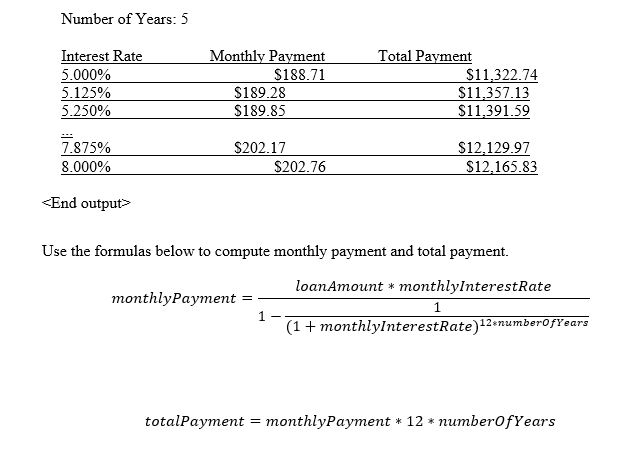
Write a program that lets the user enter the loan amount and loan period in number of years and displays the monthly and total payments for each interest rate starting from 5% to 8%, with an increment of 1/8. Here is a sample run:
<Output>
Loan Amount: 10000
Design: (Describe the major steps for solving the problem.)
Coding: (Copy and Paste Source Code here. Format your code using Courier 10pts)
Output screenshot: (Paste your output screenshot here)
Testing: (Describe how you test this program)
Submit the following items for
1. Submit this Word document with solution via LMS (you must submit the program regardless of whether it complete or incomplete, correct or incorrect)
Hint:
1. Can you get the first four rows manually? This will help you understand how to compute the numbers mathematically
Struggling with where to start this assignment? Follow this guide to tackle your assignment easily!
Project: Comparing Loans
Problem Description
You are tasked with writing a program that allows the user to enter a loan amount and loan period (in years), then computes and displays the monthly and total payments for each interest rate starting from 5% to 8%, with an increment of 1/8% (0.125%). The program should display the results for different rates in a readable format.
Design
To solve this problem, we will break the process down into the following major steps:
- Input Collection:
- Prompt the user to enter the loan amount.
- Prompt the user to enter the loan period (in years).
- Interest Rate Calculation:
- Loop through the interest rates from 5% to 8%, with increments of 1/8%.
- Loan Payment Calculation:
- For each interest rate, calculate the monthly and total payments. This can be done using the formula for monthly payments on a loan:
M=P×r(1+r)n(1+r)n−1M = P \times \frac{r(1+r)^n}{(1+r)^n – 1}Where:
- MM = monthly payment
- PP = principal loan amount
- rr = monthly interest rate (annual rate divided by 12)
- nn = total number of payments (loan period in years multiplied by 12)
- Display the Results:
- Display the results for each interest rate in a readable format, showing the interest rate, monthly payment, and total payment.
- Testing:
- Test the program with different loan amounts and periods to ensure correctness.
Coding (Java)
Output Screenshot
Here is an example of the output for a loan amount of $10,000 over 5 years:
Testing
To ensure the program works correctly, perform the following tests:
- Test with various loan amounts and periods:
- Loan amount: $10,000, Loan period: 5 years
- Loan amount: $20,000, Loan period: 10 years
- Loan amount: $5,000, Loan period: 3 years
- Loan amount: $50,000, Loan period: 15 years
- Verify calculations manually for a few interest rates:
- For a 5% interest rate, manually calculate the monthly and total payments using the formula and compare with the program’s output.
- Edge Case:
- Test with a loan amount of 0 or a loan period of 0 to ensure the program handles such cases without errors.
- User Input Validation:
- Ensure the program handles incorrect inputs, such as non-numeric characters, appropriately by asking the user to enter valid values.
Submission
Ensure that the following items are submitted:
- The Word document containing the solution.
- The source code of the program.
- The output screenshot displaying the result of the sample run.
Place this order or similar order and get an amazing discount. USE Discount code “GET20” for 20% discount